
Download Zalbum – Free Windows Photo Album Creator, Easy Image Organization Tool
Overview
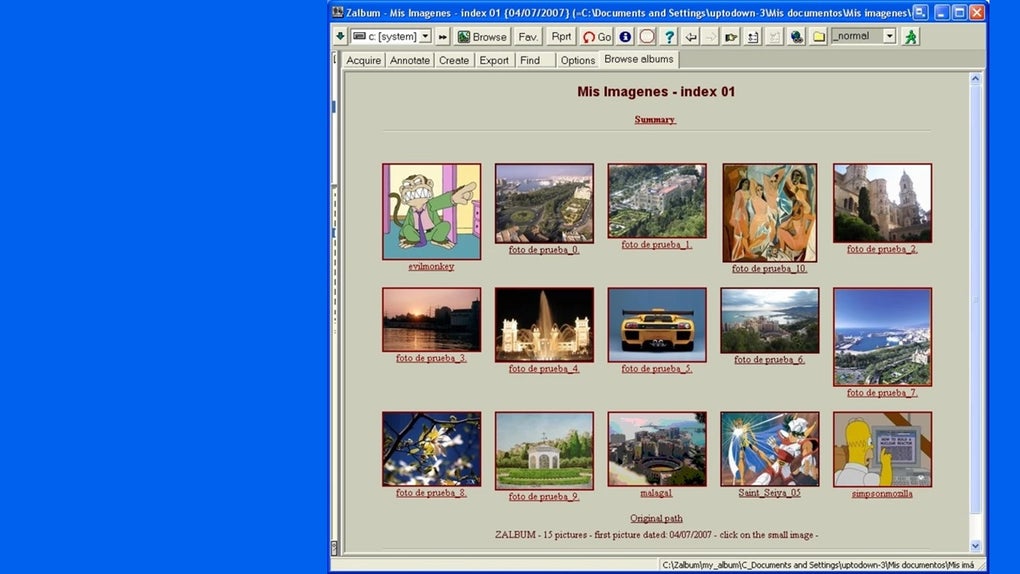
Zalbum is a lightweight, free multimedia utility designed specifically for Windows users who want to turn a chaotic collection of pictures into tidy, share‑ready photo albums with just a few clicks. Developed by Davor Zorc, Zalbum automates the album‑building process while still giving you full control over which images appear, how they are titled, and the visual layout of each page. Whether you are a hobby photographer, a small‑business owner needing product catalogs, or simply someone who wants to preserve family memories in a clean format, Zalbum offers an intuitive interface that eliminates the need for expensive desktop publishing software. The program supports direct export to a local folder or instant upload to an FTP server, making it ideal for both offline archiving and online publishing. Its minimal system requirements and zero‑cost licensing make Zalbum a compelling alternative to paid alternatives that often come bundled with unnecessary features.
Key Features & Benefits
- Automatic Album Generation: Scan a selected folder and let Zalbum automatically group images into logical albums based on file metadata, date, or custom tags.
- Customizable Layouts: Choose from multiple grid and slideshow templates, adjust thumbnail size, and add captions or titles to individual photos.
- One‑Click Export: Save the finished album to any local directory on your PC or push it straight to an FTP server for immediate web publishing.
- Drag‑and‑Drop Interface: Rearrange pictures, add or remove images, and edit titles using a simple drag‑and‑drop workflow that feels natural for Windows users.
- Free & Secure: Zalbum is completely free, with no hidden fees or trial periods, and is signed with a trusted digital certificate to ensure a safe installation.
- Regular Updates: The developer releases frequent bug‑fixes and feature enhancements, keeping the software compatible with the latest Windows builds.
- Low Resource Footprint: Runs smoothly on systems as modest as Windows 7 with 2 GB RAM, making it suitable for older PCs.
Installation & Usage Instructions
Getting Zalbum up and running is straightforward. Follow the steps below to install and start creating albums within minutes:
- Download the Installer: Visit the official Zalbum website and click the Download for Windows button. The file size is under 10 MB, ensuring a quick download even on slower connections.
- Run the Setup: Double‑click the downloaded
Zalbum_Setup.exe. Windows may prompt you to confirm that the app is from a trusted publisher—click Yes to continue. - Accept the License: Read the brief end‑user license agreement, then click Accept to proceed.
- Choose Installation Folder: The default path is
C:\Program Files\Zalbum. You can change it if you prefer a custom location. - Complete Installation: Click Install. The wizard copies files, creates shortcuts, and registers file associations for common image formats (JPG, PNG, BMP, GIF).
- Launch Zalbum: Use the desktop shortcut or start menu entry. On first launch, you’ll be greeted with a welcome screen offering a quick tutorial.
- Create Your First Album: Click New Album, select the source folder containing your photos, and let Zalbum scan the directory. You can then manually add or remove pictures, edit titles, and choose a template.
- Export Options: When satisfied, click Export. Choose either Save to PC (select a destination folder) or Upload to FTP (enter server address, username, and password). The export process typically finishes within seconds for standard‑size collections.
- Update Management: Zalbum checks for updates on launch. If a newer version is available, you’ll receive a prompt to download and install it automatically.
Because Zalbum uses native Windows APIs, you won’t encounter compatibility issues with most antivirus programs, and the installer cleans up after itself, leaving no orphaned registry entries.
Compatibility and System Requirements
Zalbum is built exclusively for Microsoft Windows, supporting the following versions:
- Windows 10 (64‑bit and 32‑bit)
- Windows 11 (64‑bit)
- Windows 8.1 (64‑bit and 32‑bit)
- Windows 7 SP1 (64‑bit and 32‑bit)
While the application can run on older Windows releases, the developer recommends Windows 7 SP1 or newer for optimal performance and security. Minimum hardware specifications are modest:
- Processor: 1 GHz or faster
- RAM: 2 GB (4 GB recommended for large photo collections)
- Disk Space: 50 MB free for installation + additional space for exported albums
- Graphics: DirectX 9 compatible GPU (standard integrated graphics suffice)
No additional runtime libraries are required, as Zalbum bundles the necessary .NET components. The software does not have native macOS, Linux, Android, or iOS versions, but you can run it on a Windows virtual machine if needed.
Pros and Cons
Pros
- Completely free with no hidden fees or ads.
- Fast automatic album generation saves time.
- Simple drag‑and‑drop UI suited for beginners.
- Direct FTP upload streamlines web publishing.
- Low system requirements work on older PCs.
- Regular updates keep the app secure and compatible.
Cons
- Limited to Windows; no native macOS or mobile versions.
- Advanced layout customization (e.g., custom CSS) is not available.
- No built‑in cloud storage integration (e.g., Google Drive, Dropbox).
- Batch editing of image metadata must be done outside the app.
- Export formats are limited to static HTML folders; no PDF or e‑book output.
Frequently Asked Questions
Is Zalbum really free, or are there hidden charges?
Zalbum is completely free to download and use. There are no trial periods, premium upgrades, or hidden in‑app purchases. The developer funds the project through optional donations.
Can I import videos or only images?
Zalbum currently supports only standard image formats (JPG, PNG, BMP, GIF). Video files are not recognized, but you can create separate photo albums for screenshots extracted from videos.
How secure is the FTP upload feature?
The FTP client built into Zalbum uses standard FTP over port 21. For secure transfers, you can manually configure FTPS (FTP over TLS) in your server settings. Passwords are stored only for the duration of the session and are never transmitted in plain text unless the server requires it.
Will Zalbum work on Windows 10 Home edition?
Yes, Zalbum runs on all mainstream Windows 10 editions, including Home, Pro, and Enterprise, provided the system meets the minimum hardware requirements.
Can I customize the HTML output after export?
Absolutely. Zalbum exports a clean folder structure containing HTML, CSS, and image files. You can open the HTML files in any editor to tweak styles, add scripts, or integrate the album into an existing website.
Final Verdict & Call to Action
Zalbum delivers on its promise of effortless album creation for Windows users. Its intuitive interface, automatic grouping, and straightforward export options make it a valuable tool for anyone who needs to organize large photo collections without learning complex design software. While the lack of cross‑platform support and advanced customization may deter power users, the free price tag and low resource usage more than compensate for those limitations. If you’re looking for a secure, fast, and user‑friendly way to turn scattered images into polished albums—whether for personal memories or small‑business showcases—Zalbum is definitely worth a download.
Ready to streamline your photo organization? Download Zalbum now and start building beautiful albums in minutes.